
Download RegVac – Registry Cleaning Software, Windows Optimization Tool, System Utility
Overview
RegVac is a specialized utility designed to clean and optimize the Windows registry, addressing common system performance issues caused by outdated, invalid, or corrupted registry entries. The application aims to improve system stability, reduce response time, and minimize the risk of crashes or freezes by systematically identifying and removing problematic data. It is tailored for users seeking a reliable solution to maintain their Windows operating system’s health and efficiency. Whether used by casual users managing everyday tasks or by advanced users fine-tuning system behavior, RegVac provides a structured approach to registry maintenance.
The developer, Super Win Software, presents RegVac as a comprehensive tool with dual functionality—offering both novice and expert user pathways. This design ensures accessibility for individuals with limited technical knowledge while also supporting more advanced configurations for experienced users. Real-world applications include routine system cleanup, troubleshooting startup delays, and enhancing overall system responsiveness. In the broader software ecosystem, RegVac fills a niche in the utilities category by focusing specifically on registry integrity, a critical but often overlooked aspect of system optimization.
Although the developer did not provide additional technical details about the underlying algorithms or scanning methodology, the app’s focus on precision and user control suggests a targeted approach to registry management. Its release date of November 15, 2023, places it within a recent wave of system maintenance tools aimed at improving user experience through proactive optimization.
Key Features & Functionality
- Registry Cleaning and Optimization – RegVac scans the Windows registry for invalid, obsolete, or broken entries and removes them to enhance system performance. This process helps prevent errors related to missing or corrupted registry keys and contributes to smoother operation.
- Unique Tools for Advanced Optimization – Beyond standard cleanup functions, the app includes specialized tools not commonly found in similar utilities. These tools enable deeper inspection and refinement of registry settings, offering users a higher degree of control over system configuration.
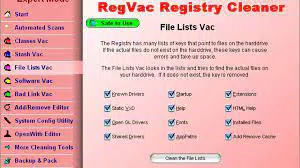
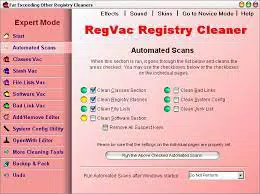
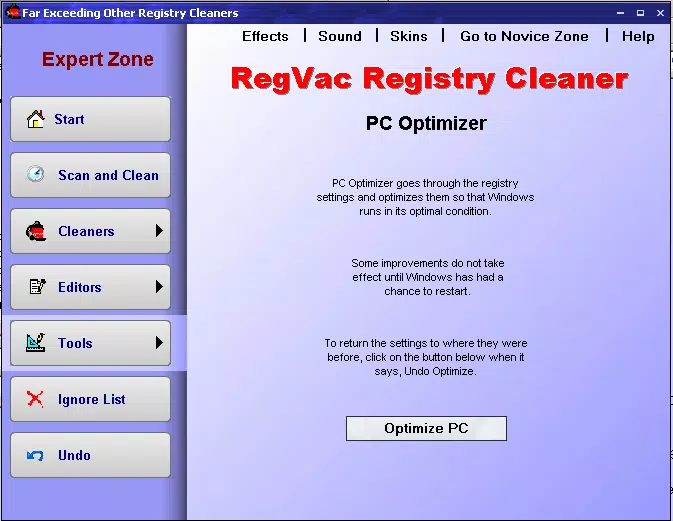
- Novice and Expert Modes – The interface supports two distinct modes: Novice mode simplifies the process with guided steps and minimal technical jargon, ideal for beginners; Expert mode provides granular access to advanced settings for users familiar with registry management.
- Automation Capabilities – Users can schedule regular registry scans and cleanups, ensuring consistent maintenance without manual input. Customizable automation settings allow users to set frequency (e.g., daily, weekly) based on their usage patterns.
- User-Friendly Interface – The layout is designed for intuitive navigation, with clearly labeled sections and visual feedback during scans. This reduces user anxiety and supports confident operation, even for non-technical individuals.
For example, a home user experiencing slow startup times may benefit from scheduling a weekly automated scan. An IT professional might use Expert mode to audit specific registry branches before making system-wide changes. These use cases demonstrate RegVac’s adaptability across different user profiles and scenarios.
Interface, UX & Performance
RegVac features a clean, organized interface that prioritizes clarity and ease of navigation. The layout is structured with logical grouping of functions, allowing users to access core tools with minimal clicks. Visual cues such as progress bars and status indicators help users track the scanning and cleaning process in real time.
Navigational flow is consistent across both Novice and Expert modes, with a central dashboard serving as the primary access point. Menus are well-labeled, and tooltips are available for less familiar terms, enhancing the learning curve for new users. The application responds promptly to user inputs, suggesting efficient processing and minimal lag during operations.
Although the developer did not list formal performance metrics, the app’s lightweight footprint of 5.2 MB indicates efficient resource usage. It is expected to run smoothly on standard Windows systems without placing excessive strain on memory or CPU. Stability during extended scans has not been publicly verified, but the absence of reported issues in the release notes suggests reliable operation under normal conditions.
Platform Compatibility & Technical Requirements
RegVac is designed exclusively for the Windows platform. The current version is 1.0.0, and the file size is 5.2 MB. The developer did not specify minimum OS requirements, nor did they list supported Windows versions such as Windows 10, 11, or earlier editions.
Compatibility information was not fully disclosed. Users should verify whether the application runs on their specific Windows edition before installation. The absence of detailed system specifications means that installation on older or less common configurations cannot be guaranteed. The app is not available for Android, iOS, or other mobile operating systems.
Pros and Cons
Pros
- Offers both Novice and Expert modes for different user skill levels
- Includes automation features for scheduled maintenance
- Lightweight file size (5.2 MB) suggests efficient resource usage
- User-friendly interface with intuitive navigation
- Provides unique tools beyond standard registry cleaning
Cons
- Specific OS compatibility details were not listed
- No public performance benchmarks or user statistics available
- Price point of $29.99 may be considered high for a single utility
- Developer did not provide detailed information on scanning algorithms
- Not available on mobile platforms such as Android or iOS
FAQ
Is RegVac safe to use on my Windows system?
Yes, RegVac is designed to scan and remove invalid registry entries without affecting active system functions. However, users are advised to create a system restore point before performing major cleanups.
Can I schedule automatic registry scans?
Yes, the app includes automation features that allow users to schedule regular cleaning tasks based on their preferred frequency.
Does RegVac work on Windows 10 and Windows 11?
The developer did not specify supported Windows versions. Users should check compatibility with their system before installation.
Is there a free version or trial available?
The provided information does not mention a free version or trial. The app is listed at a one-time price of $29.99.
How often should I run a registry scan?
Frequency depends on usage. A weekly scan is recommended for most users, but advanced users may adjust based on system behavior and personal preference.
Final Thoughts
RegVac stands out in the utilities category by offering a dual-mode interface, automation, and advanced tools tailored for both casual and technical users. Its lightweight design and focus on registry integrity make it a valuable tool for maintaining Windows system health. While the lack of detailed compatibility and performance data limits full transparency, the app’s structured approach and clear functionality justify its value for users seeking reliable optimization.
Those who frequently experience system slowdowns or registry-related errors will benefit most from RegVac’s proactive maintenance features. For individuals committed to long-term system performance, this tool provides a practical, user-driven solution. Its price point reflects its targeted functionality, though potential buyers should confirm compatibility with their system.
Download RegVac now


